
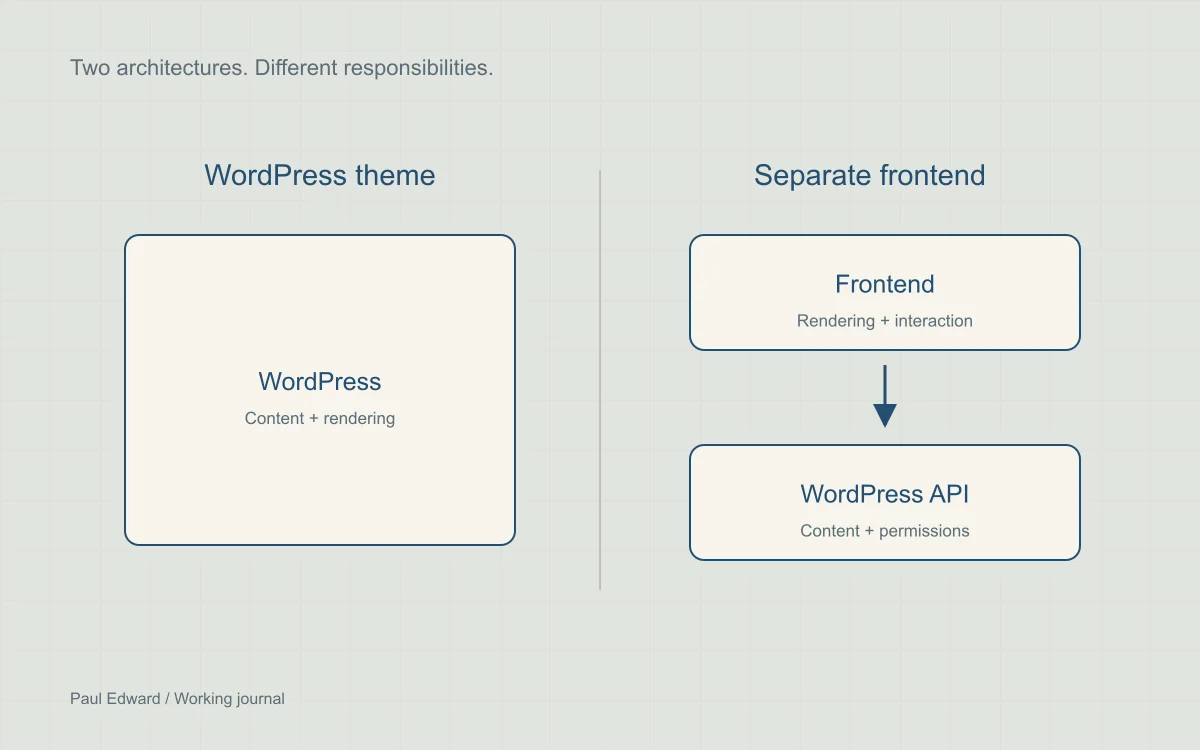
What actually changes when WordPress goes headless?
In traditional WordPress, the theme renders the public site alongside the content-management system. A headless setup uses WordPress as a content backend and a separate application to render the frontend, usually through an API. Both can serve fast public pages when their rendering and caching are designed well.
A modern theme can use a build pipeline and small interactive components without separating the frontend completely. Conversely, a headless frontend need not render every request dynamically. Evaluate the proposed implementation rather than the label.
Compare the responsibilities
| Concern | WordPress theme | Separate frontend |
|---|---|---|
| Publishing | Native preview and theme rendering | Build and test authenticated preview and invalidation |
| Integrations | Many plugins supply frontend output | Audit API support and rebuild presentation as needed |
| Operations | One primary application to deploy | Coordinate CMS, frontend and API releases |
| Content reuse | APIs remain available when needed | Independent clients can share a content contract |
| Performance | Depends on theme, cache and backend work | Depends on rendering, API calls, cache and hydration |
When a WordPress theme is a good fit
A content-led business site with a small maintenance team often benefits from keeping previews, forms and publishing in one application. Invest first in a lean theme, appropriate caching, responsive images and accessible interactions. There is no need to introduce another runtime merely to achieve a modern visual design.
Check what your editors actually do: preview a draft, schedule a post, change a menu, replace an image and correct a broken link. The architecture should make those tasks reliable without routine developer intervention.
When a separate frontend earns its complexity
Headless can be appropriate when the site shares structured content with other products, the frontend has substantial application behavior, or teams need independent release cycles. Security boundaries may also matter, but merely separating rendering does not make the CMS or API secure.
Specify authentication, preview, redirects, canonical URLs, sitemaps, image handling, localization and form submission. Decide how unpublishing and permission changes remove cached content. WooCommerce implementations need particular attention to sessions, checkout extensions and payment flows.
Estimate ownership cost with a prototype
- Build one representative page and the hardest integration in each viable option.
- Measure cold and warm requests, transferred JavaScript and interaction behavior on a modest phone.
- Ask an editor to preview, schedule, update and unpublish content.
- Simulate an API outage and a failed deployment. Document who restores service.
- Estimate implementation, hosting, monitoring and ongoing engineering time using your actual workload.
Do not rely on a universal cost multiplier or a claimed percentage of businesses that should choose one stack. Team capability, integrations and content freshness often matter more than hosting price alone.
Frequently asked questions
Is headless inherently better for SEO?
No. Both approaches can expose readable HTML, crawlable links and accurate metadata. A separate frontend creates extra places to get those details right. Choose the architecture that your team can maintain correctly over time.
Is headless WordPress automatically faster?
No. Either architecture can deliver fast HTML, and either can add unnecessary scripts or slow backend calls. Compare equivalent pages using cold and warm requests, content visibility and interaction traces. Use the rendering strategy guide to separate architecture labels from actual request behavior.
Will my WordPress plugins work with a separate frontend?
Not necessarily. A plugin may provide administration features or data through an API while depending on theme hooks for its public interface. Audit forms, search, previews, redirects and commerce extensions individually, and budget for rebuilding unsupported presentation and workflows.
When is a traditional WordPress theme the better choice?
It is often a good fit for a content-led business site whose editors need reliable previews, scheduling, forms and updates in one application. Consider a separate frontend when independent clients, application behavior or release requirements justify its additional operational work.
Sources and further reading
Keep exploring
Read the SSR, SSG and ISR comparison or explore WordPress development.
Leave a Reply