Every few weeks a new tool promises a complete website from a single sentence. Type “a bakery in Leeds with online ordering”, wait thirty seconds, and a finished site appears. It is reasonable for a business owner to ask whether a content management system like WordPress still has a future, or whether AI is about to make it obsolete.
The honest answer is that AI is replacing a task — producing the first draft of pages and code — not the system that keeps a website running after launch day. This article separates those two things, shows where the gap appears with an animated example, and explains what is genuinely changing for WordPress sites.
Why the question keeps coming up
Generative AI is good at exactly the part of website work people see first. It can draft a homepage, suggest a layout, write product descriptions and produce working code for a component. Ten years ago those were days of effort; now they can take minutes. When the visible part of a job becomes fast, it is natural to assume the whole job is disappearing.
At the same time, more people now ask AI assistants questions they used to type into a search engine. If the assistant answers directly, a business might wonder why it needs a website at all, let alone a CMS behind it.
Both observations are true. Neither one means the CMS is going away. To see why, it helps to follow a single page past the moment it is generated.
What a website actually has to do after the first draft
A business page is not a document you produce once. Over its life it has to be checked before it goes live, published at an address that does not change, edited when a price or a policy changes, protected from accidental or malicious edits, and kept reachable when the site is reorganised. Those jobs are what a content management system exists to do, and they are where an AI generator on its own runs out.
Follow one page through its life. Switch between an AI generator on its own and AI working inside a content management system.
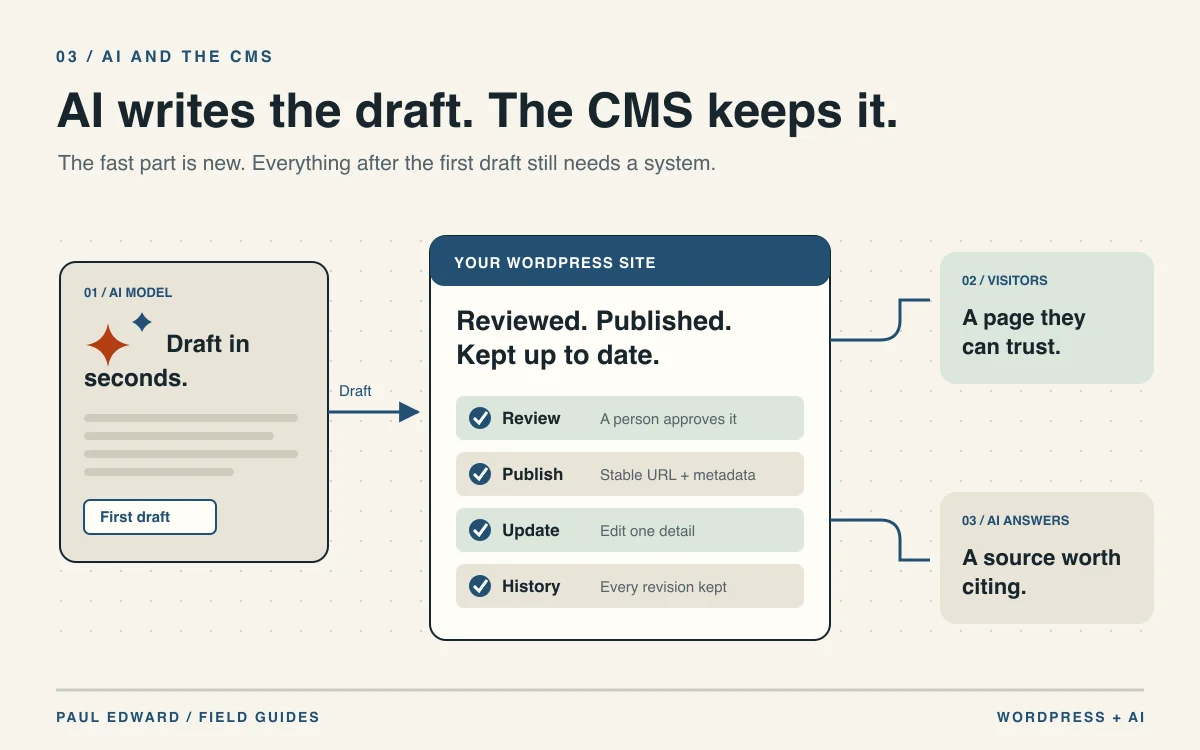
An AI model drafts the copy, layout and images in seconds. Both scenarios start here: the speed of the first draft is real.
A person checks facts, prices, claims and tone, with the draft saved where colleagues can comment on it and approve it.
AI generator only: There is nowhere to keep drafts and approvals, so review happens in a chat thread — or not at all.
The page gets a stable URL, a title, a description and structured data, and it appears in the sitemap that search engines read.
A price changes. An editor corrects that sentence, and the rest of the page — and its address — stays exactly as it was.
AI generator only: Asking the model again can rewrite the whole page: headings, wording and links you never meant to change.
Revisions show who changed what. Roles limit who can publish. Redirects, backups and updates keep the page reachable for years.
AI generator only: No revision history, no roles, no redirects. When something breaks, nobody can see what changed or who changed it.
An illustrative workflow. Some AI site builders include parts of a content system; check which of these steps a tool really covers before you rely on it.
The problem, in a concrete example
Take an illustrative case: a dental practice generates its new website with an AI builder in an afternoon. It looks professional and launches the same week. Two months later the practice changes its emergency appointment fee. Somebody asks the tool to update the fees page. The regenerated page has the new fee — and also a rewritten introduction, a different heading structure, and an internal link to a treatment page that no longer exists.
Nobody notices for a week, because there is no review step and no revision history to compare against. When a patient points out the broken link, there is no record of what the page said before, who approved the change, or how to restore the earlier version. The first draft was fast. Everything after it was fragile.
Now take the same practice with AI working inside a CMS. The model drafts the new fees paragraph. An editor reviews only that change, publishes it, and the rest of the page — its address, headings, links and metadata — stays exactly as it was. If the change is wrong, the previous revision is one click away. The AI saved the same amount of writing time in both versions; only one of them kept the website under control.
Where AI genuinely changes website work
None of this is an argument that AI is overhyped. Used inside a proper system, it removes real effort:
- First drafts. Service descriptions, FAQ answers and article outlines that an expert then corrects and sharpens.
- Repetitive editing. Alt text suggestions, meta description drafts, summaries and consistent formatting across many pages.
- Translation. A useful starting point for multilingual sites, provided a fluent person reviews anything customer-facing.
- Development. Faster scaffolding of themes, blocks and integrations — with an experienced developer reviewing what goes into production.
- Operations. Turning incoming emails, invoices or product data into structured records that the website then publishes.
Each of those makes a WordPress site cheaper to run and quicker to improve. None of them removes the need for a place where content is stored, reviewed, versioned and published.
WordPress is adding AI to the CMS, not losing to it
The WordPress project has been building AI support into the platform itself rather than treating it as a competitor. WordPress 6.9 introduced the Abilities API, a central registry that describes what a site can do in a form AI agents and automation tools can discover. WordPress 7.0 added a shared AI Client and a Connectors screen, so a site owner can configure an AI provider once and let plugins use it. A separate MCP Adapter lets AI assistants that speak the Model Context Protocol work with a WordPress site through those abilities.
The practical meaning is simple: the AI model becomes one more tool connected to the CMS, chosen and paid for by the site owner. You can switch providers without rebuilding the website, and the content stays in your database rather than inside the tool that drafted it.
That is also why the platform question matters less than people expect. WordPress runs about 40% of all websites, according to W3Techs’ usage survey. An ecosystem of that size adapts to new technology — as it did with mobile, e-commerce and block editing — rather than being displaced by it overnight.
AI search still runs on published pages
The second worry — that AI assistants will answer every question so websites stop mattering — has the dependency backwards. An assistant with web access does not invent knowledge about your business. It retrieves published pages, summarises them and, in many products, links to them as sources. The page someone publishes and maintains is the raw material.
AI assistants change how people find a business. They still need published pages to read. Switch the scenario to see what happens without one.
“Who can clean up a hacked WordPress site?” The question goes to an AI assistant instead of a search box.
Assistants with web access search an index or crawl published pages. They work from the text they can actually retrieve.
The reply is written from the retrieved text. Clear headings, specific facts and named authors are easier to quote correctly.
No readable page: With nothing of yours to read, the answer is built from other sources — often a competitor or a directory listing.
Many assistants show the pages they used. A citation is a new kind of visit — and it points to a page on a website.
No readable page: Your business is not among the linked sources, so there is no path back to you.
The visitor lands on the cited page, reads the detail and contacts the business. The website is still where the decision happens.
No readable page: The customer never reaches your site. The decision happens on someone else’s page.
A conceptual flow. Assistants differ in how they search, which crawlers they use and whether they cite sources. Nothing here guarantees a citation.
Consider an illustrative example: a homeowner asks an assistant which local firms install heat pumps and what the process involves. Firms with clear, current service pages — areas covered, what an installation includes, how long it takes, how to book an assessment — give the assistant something specific to retrieve and cite. A firm whose only presence is a thin directory listing, or a website whose text is hidden behind scripts the crawler does not run, is simply not part of the answer.
Google’s guidance on using generative AI content points in the same direction. AI-assisted pages are acceptable when they are accurate and useful; generating many pages without adding value can fall under its spam policy on scaled content abuse. In other words, the winners are not the sites that publish the most AI text, but the sites that publish the most useful, verifiable information — which needs an editorial process, and a system to run it in.
For how WordPress compares with AI-first builders specifically on search visibility, see WordPress vs AI website builders for SEO.
When an AI builder is the right choice
There are honest cases where an AI site builder is enough, and a full CMS would be unnecessary weight:
- A one-page site for an event, a launch or a short campaign that will be retired.
- A prototype to test an idea with real visitors before investing in a proper build.
- A very small business site that rarely changes and does not rely on search for new customers.
The calculation changes when the website is expected to grow, rank, take enquiries, sell products, or be edited by several people over several years. That is the point at which content ownership, review, revisions and stable URLs stop being technicalities and start protecting revenue.
| Need | AI generator on its own | AI inside WordPress |
|---|---|---|
| A fast first draft | Yes | Yes |
| Review before publishing | Depends on the tool | Drafts, roles and approvals built in |
| Small edits without side effects | Regeneration can change more than intended | Edit one paragraph; the rest stays |
| History and rollback | Often limited or absent | Revisions for every change |
| Choice of AI provider | Usually the tool’s own model | Your choice, configured once |
| Owning your content | Check export options carefully | Your database, exportable |
How to plan for AI on a WordPress site
- Keep WordPress as the record. Whatever drafts the content, the reviewed version lives in the CMS, with its revision history.
- Put a person in the publishing path. AI drafts; someone accountable approves facts, prices, claims and anything legal or medical.
- Use AI where volume hurts. Alt text, summaries, translations, product data and first drafts — not final judgement.
- Keep pages readable without scripts. Server-rendered HTML that search engines and AI crawlers can read on the first request.
- Choose providers you can change. Connect AI through the platform rather than locking your content into one vendor’s tool.
If you want AI built into an existing WordPress or Laravel system — drafting, data extraction or an assistant that answers from your own content — see AI development. For the engineering detail behind retrieval systems, read production RAG: retrieval, permissions and cost control.
Frequently asked questions
Will AI replace WordPress?
Not in the foreseeable future. AI replaces the task of writing first drafts and boilerplate code. A website still needs somewhere to review, publish, edit, version and protect its content, and WordPress is adding AI to that system rather than being displaced by it.
Can I build my whole business website with an AI builder instead?
For a small, rarely changed site or a short campaign, yes. For a site that must grow, rank, take enquiries or be edited by several people for years, check whether the tool offers review, revision history, URL control, redirects and a full content export before you rely on it.
Does WordPress have built-in AI?
WordPress 6.9 introduced the Abilities API, and WordPress 7.0 added an AI Client with a Connectors screen where a site owner configures an AI provider once for plugins to use. You bring your own provider; no single AI model is bundled.
Will AI-written content hurt my rankings?
Google does not penalise content for being AI-assisted. It does act against pages produced at scale without adding value. Accurate, reviewed and genuinely useful content is what matters, however it was drafted.
Do websites still matter if people ask AI assistants instead of searching?
Yes. Assistants with web access answer from published pages and often cite them. Clear, current, crawlable pages are what an assistant can retrieve and link to; without them, the answer is built from other people’s sites.
Sources and further reading
- WordPress AI team: Abilities API
- WordPress.com: How WordPress 7.0 is building the foundation for AI-powered sites
- WordPress AI team: MCP Adapter
- Google: Using generative AI content on your website
- W3Techs: Usage statistics of WordPress
- Why WordPress is a strong foundation for business SEO
Thinking about rebuilding, or adding AI to a site you already have? Explore WordPress website development and start with the work your team repeats every week.