AI website builders are impressive at the first impression. Describe your business, and a few minutes later you have a polished site with copy, images and a contact form. For search visibility, though, the first impression is the least important moment. What matters is what search engines and AI crawlers receive from your pages, how much of it you control, and whether the value you build up over years can move with you.
This comparison looks at exactly those three things. It explains each problem with an animated example, and it is fair about where an AI builder is good enough. The short version: WordPress is the stronger choice for SEO when search is a serious source of customers, because it gives you readable HTML, full control of the technical signals, and ownership of everything you publish.
What “better for SEO” actually means
No platform ranks a page by itself. Google’s own documentation is clear that there is no CMS bonus; pages compete on relevance, quality and usefulness. So the useful question is not “which platform does Google prefer?” but “which platform makes the necessary work possible, reliable and lasting?” For SEO, that comes down to four practical tests:
- Crawlability: can every important crawler read the content on the first request?
- Control: can you set titles, descriptions, canonicals, structured data, redirects and the sitemap yourself?
- Quality at scale: does publishing more pages add useful information, or just volume?
- Ownership: if you change platform in five years, do your addresses, metadata and history survive?
WordPress is not automatically good at all four — a poorly built theme can fail several of them. The difference is that every one of them is within your reach to fix. On many AI builders, some of them are decided for you.
Test 1: can crawlers read the page?
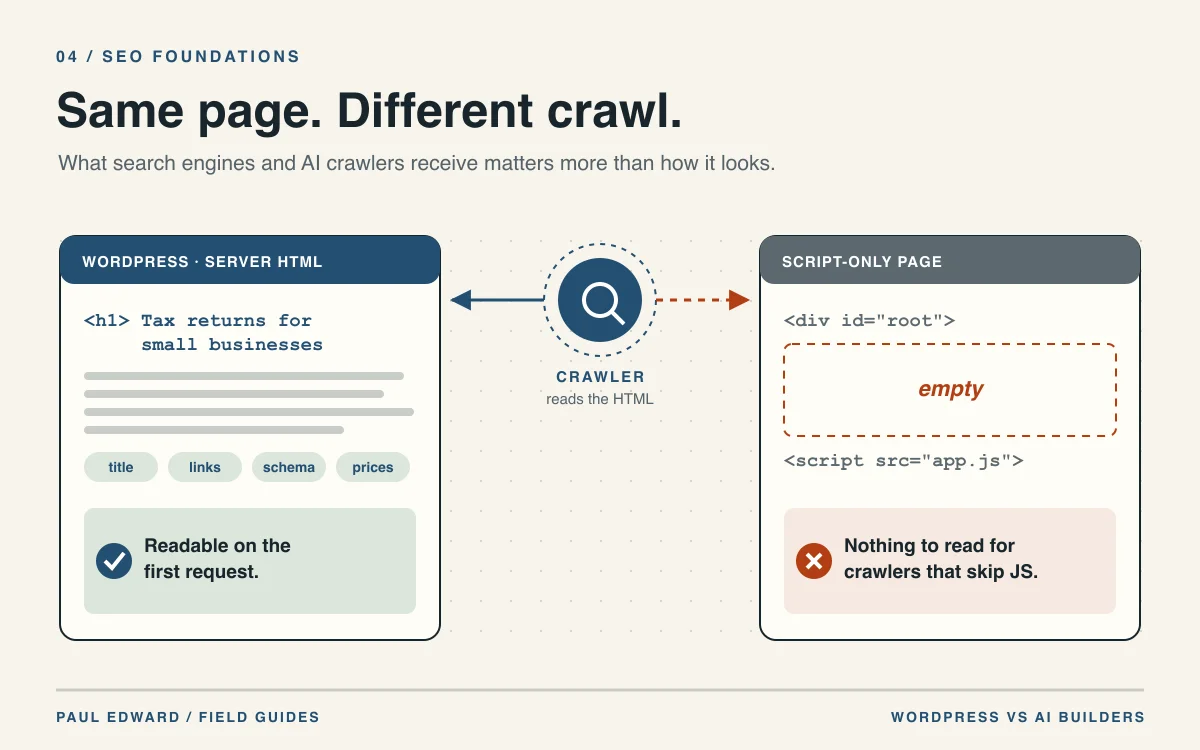
A page that looks perfect in your browser can be almost empty to a crawler. Some site builders, and many modern JavaScript frameworks, send a nearly blank HTML document and draw the content in the browser with JavaScript. A person never notices. A crawler that does not run that JavaScript sees a container with nothing in it.
Two pages can look identical in a browser. Switch the scenario to see what reaches a crawler that reads only the HTML.
Googlebot, Bingbot and AI crawlers such as GPTBot request the page much as a browser does.
A WordPress theme sends finished HTML: the headings, text, links, title and structured data are in the first response.
JavaScript-only page: The server sends an almost empty document — a container and a script tag. The words only arrive later, in the browser.
Google can execute JavaScript in a later rendering step. Many AI crawlers do not run JavaScript at all.
The crawler reads the headings, copy, links and metadata it received.
JavaScript-only page: A crawler that does not run JavaScript sees the empty container: no headings, no copy, no links.
The page can be indexed, ranked or used as a source for an AI answer.
JavaScript-only page: Google may index the page after rendering, sometimes later. AI crawlers that read only HTML have nothing to store or cite.
Not every AI builder renders this way. Open “View page source” on your own pages: if the words are missing there, a crawler that skips JavaScript misses them too.
The problem, in a concrete example
Imagine an illustrative accountancy firm whose new AI-built site renders its service pages in the browser. Open “View page source” on the tax-return service page and you find a <div id="root"></div> and a script tag — no heading, no description of the service, no prices, no internal links.
Google can still get there: its documentation explains that pages are queued for rendering after crawling, which “can take longer” than a few seconds, and it recommends server-side or pre-rendering because “not all bots can run JavaScript.” That second point is the bigger risk today. A study of AI crawler traffic by Vercel found that none of the major AI crawlers render JavaScript — including OpenAI’s, Anthropic’s, Meta’s and Perplexity’s. For those systems, the firm’s service page has no content to index, quote or cite.
A standard WordPress theme renders on the server. The heading, copy, links, title and structured data are in the first response, so Googlebot, Bingbot and AI crawlers all read the same complete page. If you want to check your own site, the test takes ten seconds: view the source of an important page and search for a sentence from its body text. If the sentence is not there, crawlers that skip JavaScript cannot see it either.
To be fair, many builders do render on the server, and a WordPress site rebuilt as a client-side app can make the same mistake. The point is not the brand; it is that with WordPress, the rendering method is yours to choose and verify. For the architecture behind this, see SSR vs SSG vs ISR.
Test 2: can you control the technical signals?
Search engines rely on a set of technical signals that you, not the platform, should decide: the page title and description, the canonical URL when similar pages exist, structured data that describes the business or article, the robots rules, the XML sitemap, and redirects when an address changes.
In WordPress every one of those is editable, either through the theme or a single, well-chosen SEO tool, and a developer can fix anything the interface does not expose. On AI builders the picture varies. Some expose titles and descriptions but not canonical tags. Some generate structured data you cannot edit. Some offer redirects only on higher plans. When a ranking problem appears, the question “can we change that?” should never be answered by a pricing page.
| Signal | WordPress | Typical AI builder — check first |
|---|---|---|
| Server-rendered HTML | Standard in themes | Varies by product and framework |
| Titles and descriptions | Per page, fully editable | Usually editable |
| Canonical URLs | Editable per page | Often automatic only |
| Structured data | Fully customisable | Often fixed or limited |
| URL structure | Yours to design | Sometimes fixed patterns |
| Redirects | Unlimited, server or plugin | May be limited by plan |
| robots.txt and sitemap | Fully controllable | Often generated, partly editable |
| Performance tuning | Hosting, caching and code are yours | Decided by the platform |
The table is a checklist, not a verdict on any single product: builders change quickly, and some cover more of it than others. Ask for a demonstration of each row before you commit, and check the generated HTML rather than the settings screen.
Test 3: does publishing more pages help or hurt?
The selling point of many AI builders is volume: a page for every service, every town, every product variation, generated in minutes. For SEO that is a trap. Google’s guidance on generative AI content warns that using AI to generate many pages without adding value for users may violate its spam policy on scaled content abuse.
Consider an illustrative plumbing company that generates forty “emergency plumber in [town]” pages with the same paragraph and a different place name. Each page is thin, the pages compete with each other, and none of them is a better answer than the one service page they copied. Ten useful pages — real service areas, real response times, real examples of work — would serve customers and search engines far better than forty clones.
WordPress does not stop anyone from making that mistake, but its strengths point the other way: an editorial workflow with drafts and reviews, categories and internal links that organise genuine expertise, and revisions that let you improve a page instead of replacing it. AI can still help — drafting, summarising, suggesting structure — inside a process that adds the facts only your business has. For the editorial side of this, see why WordPress is a strong foundation for business SEO.
Test 4: what do you keep if you leave?
SEO value accumulates slowly. Every link another site points at one of your URLs, every page that has ranked for a year, every structured title and description is part of an asset you are building. The real test of a platform is what happens to that asset when you move.
Search value builds up over years in addresses, links and content. Switch the scenario to see what has to survive a move.
WordPress exports posts, pages, authors and media in a standard format, and the database itself belongs to you.
Closed builder: Exports vary: some builders give you the text and images, others only a static copy of the finished pages.
The permalink structure is yours to set, so the new site can answer at the same URLs that already rank and earn links.
Closed builder: Some builders fix the URL pattern, so the same addresses may not be possible on the new platform.
Where an address has to change, a permanent (301) redirect sends visitors and search engines to the new page.
Closed builder: Redirect rules may be limited, or switched off when you cancel — exactly when you need them.
Search titles, descriptions, canonical tags and schema live in the database next to the content they describe.
Closed builder: Titles, descriptions and structured data may not be part of the export at all.
Revisions, publication dates and authors stay attached to each page, so the new site keeps its track record.
Closed builder: Revision history and original dates usually stay behind on the old platform.
Platforms change their export features. Ask for a sample export and check URL control before you commit — not when you are leaving.
The problem, in a concrete example
Picture an illustrative training company that has run its site on a closed builder for four years. Its course pages rank well and have attracted links from industry associations. It decides to move platform to add online booking. The builder’s export provides the page text and images, but the course URLs followed the builder’s fixed pattern, the titles and descriptions are not in the export, and the redirect feature ends with the subscription.
The new site launches with different addresses and no redirects in place. The association links now lead to error pages, Google has to rediscover every course from scratch, and the descriptions written over four years have to be reconstructed by hand. Rankings that took years to earn drop within weeks — not because the new site is worse, but because the old platform kept the parts that carried the value.
With WordPress, the same move is a planned migration rather than a rebuild. The content and its metadata are in your database, the export format is open, you choose the permalink structure on the new site, and you can put permanent redirects in place for any address that must change. Even moving away from WordPress is easier, because nothing is locked inside a vendor account.
Where an AI builder is good enough
There are situations where an AI builder is a perfectly sensible choice, and recommending a full WordPress build would be over-engineering:
- A landing page for an event or campaign with a fixed end date.
- A prototype to test demand before investing in a proper site.
- A small brochure site where customers come from referrals, not search.
If search is, or should become, a meaningful source of enquiries or sales, the four tests above start to matter more than the speed of the first draft. That is usually the moment WordPress pays for itself.
How to decide for your business
- View the source of an existing or demo page on each platform and look for your body text.
- List the signals from the table and confirm each one is editable on the plan you would actually buy.
- Request a sample export and check whether URLs, titles, descriptions and structured data are in it.
- Plan the content around real customer questions, not the number of pages a tool can generate.
- Decide who maintains it. WordPress gives you control; someone has to own updates, security and performance.
If the answer points to WordPress, see WordPress website development for a hand-built site with server-rendered pages and SEO handled properly from the start. For the broader question of where AI fits, read Will AI replace WordPress?
Frequently asked questions
Is WordPress better than AI website builders for SEO?
For a site that relies on search, usually yes. WordPress themes render content on the server, every technical signal is under your control, and you own the content, URLs and metadata. Some AI builders handle parts of this well, so check crawlability, control and exports for the specific product.
Can Google index websites made with AI builders?
Yes. Google can render JavaScript, although rendering is queued after crawling and can be delayed. The larger gap is with AI crawlers: Vercel’s research found the major ones do not run JavaScript, so content drawn only in the browser may be invisible to them.
How can I tell if my pages are readable without JavaScript?
Open an important page, choose “View page source” and search for a sentence from the body text. If it appears in the source, crawlers receive it on the first request. If you only see a container and script tags, the content depends on JavaScript.
Will mass-produced AI pages help my rankings?
Rarely, and they can do harm. Google’s guidance says generating many pages without adding value may violate its scaled content abuse policy. A smaller set of genuinely useful pages is the safer and more effective approach.
Will I lose my rankings if I move from a builder to WordPress?
Not if the migration is planned: keep the same URLs where possible, set permanent redirects for any that change, carry over titles, descriptions and structured data, and check the new site before launch. Losses usually come from unplanned moves.
Sources and further reading
- Google: Understand the JavaScript SEO basics
- Vercel: The rise of the AI crawler
- Google: Using generative AI content on your website
- Google: SEO Starter Guide
- Technical SEO for WordPress: crawling, canonicals and content
Weighing a rebuild or a migration? Start with the pages that bring customers today, and explore WordPress website development for a plan that keeps what already ranks.